

 February 24, 2026
  12 Min
  No Comment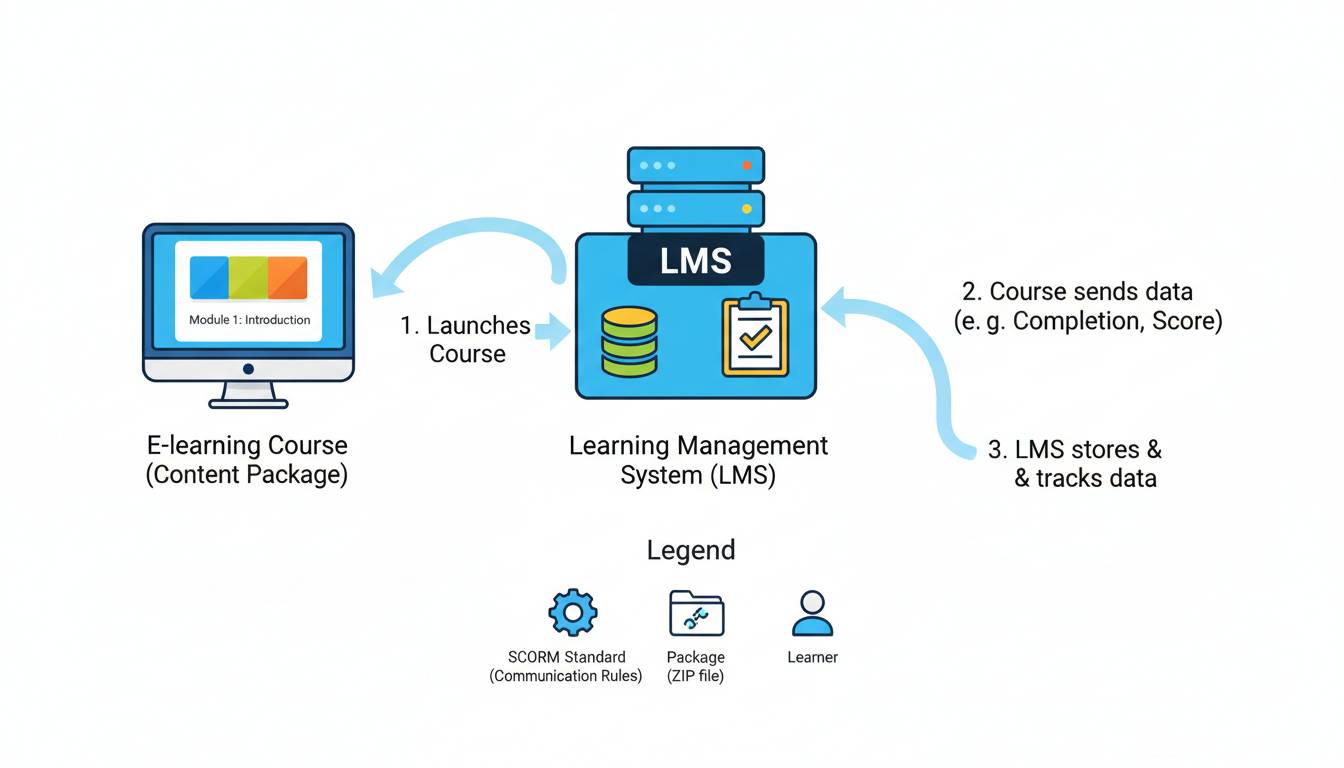
If you have built an online course, you have probably wondered how it “talks” to the learning management system. That is where SCORM comes in. Understanding SCORM matters for course creators because it determines whether your training content plays smoothly across different platforms, tracks learner progress accurately, and scales as your course library grows. This guide covers what you need to know without drowning you in technical jargon.
What is SCORM?
SCORM stands for Sharable Content Object Reference Model. It is a set of technical standards that governs how e-learning content interacts with Learning Management Systems. Developed by the Advanced Distributed Learning Initiative in the late 1990s, SCORM creates a universal language between course content and the software that delivers it. When a course is built to SCORM standards, it can be loaded into any SCORM-compliant LMS without custom programming for each platform.
The main benefit for course creators is interoperability. You can author a course in Articulate Storyline, upload it to your company’s LMS, and it works—complete with progress tracking, quiz scores, and completion data. That seamless experience exists because of SCORM. Without a standard like this, every course would need individual integration work for every LMS, and content sharing between organizations would be nearly impossible.
SCORM has three main components. The Run-Time Environment defines how content and the LMS exchange data during a learner’s session. The Content Aggregation Model organizes how learning objects are packaged and described. Sequencing and Navigation controls the order in which learners move through content. Together, these elements ensure consistency across the entire learning experience.
Why Course Creators Should Care About SCORM
Several practical reasons make this standard worth your attention.
First, SCORM ensures your courses are portable. When you invest time and resources into creating training content, you want that content to work wherever you need it. SCORM compliance means you can move courses between different LMS platforms, share content with client organizations using different systems, and avoid being locked into a single vendor. This flexibility protects your authoring investment and gives clients confidence that they are not purchasing a proprietary solution they cannot easily replace.
Second, SCORM handles the complex work of tracking learner data. The standard defines exactly how completion status, quiz scores, time spent, and interactions are communicated from the content to the LMS. You do not need to build custom tracking logic for every project. Instead, you focus on creating effective learning experiences while the standard handles the data flow in the background.
Third, SCORM is widely supported across the industry. Most major LMS platforms—including Moodle, Blackboard, Canvas, SAP SuccessFactors, and Cornerstone—support SCORM out of the box. SCORM remains the most widely adopted e-learning standard, with the vast majority of corporate learning platforms providing full support.
Fourth, many enterprise buyers require SCORM compliance when purchasing training content. If you plan to sell courses to corporate clients, government agencies, or educational institutions, SCORM compatibility is often a baseline requirement. Having SCORM-compliant courses opens doors to these large markets.
How SCORM Works
Understanding the technical side of SCORM helps you make better decisions as a course creator, even if you never write code. At its simplest, SCORM defines how two software systems—the course content and the LMS—exchange information.
When a learner launches a SCORM course, the LMS initializes a communication session with the content. The content package includes a manifest file (called imsmanifest.xml) that tells the LMS what assets are included, what learning objectives the course covers, and how the content should be organized. This metadata allows the LMS to display appropriate information to administrators and learners before and after the course launch.
During the learning session, the content communicates with the LMS through a JavaScript API. When a learner completes a module, scores a quiz, or interacts with a specific element, the content can send this information to the LMS using standardized commands. The LMS records this data in its database, making it available for reporting and analytics. When the learner exits, the LMS saves all accumulated data, ensuring nothing is lost even if the session is interrupted.
This communication happens through standardized API functions like LMSInitialize, LMSGetValue, LMSSetValue, and LMSFinish. Course authoring tools like Articulate Storyline, Adobe Captivate, and iSpring Suite handle all this JavaScript interaction automatically. As a course creator, you typically never see or write this code—the authoring tool generates it based on your design choices.
The result is a system where content creators can focus on instructional design and media development while the standard handles the plumbing underneath.
SCORM 1.2 vs SCORM 2004
One of the most common questions course creators face is which SCORM version to target. The two primary versions currently in use are SCORM 1.2 and SCORM 2004. Understanding the differences helps you choose the right one for your projects.
SCORM 1.2 was released in 2001 and remains the most widely supported version. Almost every SCORM-compliant LMS supports this version, making it the safest choice for maximum compatibility. The standard handles basic tracking requirements well, including completion status, success status (passed/failed), and scores. If your primary goal is broad LMS compatibility and you do not need advanced sequencing features, SCORM 1.2 remains a solid choice.
SCORM 2004 arrived in 2004 with several significant enhancements. The most notable addition is robust sequencing and navigation capabilities. With SCORM 2004, you can create sophisticated rules that determine which content a learner sees next based on their performance, previous choices, or mastery of prerequisites. This version also introduced more granular objectives tracking and better handling of supplementary SCOs.
The tradeoff is that SCORM 2004 support varies more among LMS platforms. While most enterprise systems handle SCORM 2004, some smaller or older platforms may only support version 1.2. Additionally, SCORM 2004 packages are slightly more complex to configure, requiring more attention to manifest settings and sequencing rules.
For most course creators, the recommendation is simple: if you need maximum compatibility and your courses have straightforward linear progression, target SCORM 1.2. If you need branching scenarios, adaptive learning paths, or complex prerequisite logic, invest the additional effort to build for SCORM 2004. Many authoring tools allow you to export to both versions from a single source file.
| Feature | SCORM 1.2 | SCORM 2004 |
|---|---|---|
| LMS Compatibility | Nearly universal | Widely supported but not universal |
| Sequencing | Basic | Advanced with rules and conditions |
| Objectives Tracking | Simple | Granular with rollup rules |
| Bookmarking | Basic | Enhanced with validation |
| File Size | Generally smaller | Slightly larger packages |
Creating SCORM-Compliant Courses
Building a SCORM-compliant course does not require programming knowledge, but it does require awareness of how your authoring choices affect SCORM packaging. Here is the practical workflow most course creators follow.
The process begins with selecting an authoring tool. Popular options include Articulate Storyline 360, Adobe Captivate, iSpring Suite, Lectora, and Camtasia. Each tool offers different strengths and pricing, but all can produce SCORM-compliant output. When evaluating tools, confirm they support both SCORM 1.2 and 2004 if you need flexibility for different clients.
Once you have designed and built your course within the authoring tool, you configure the SCORM settings during the publishing or export process. This step is where you specify which SCORM version to use, how data should be tracked, and what metadata to include in the manifest file. Most authoring tools provide wizard-style interfaces that walk you through these choices.
The key settings you will encounter include the SCORM API version (1.2 or 2004), the manifest identifier (a unique name for your package), the completion status trigger (when is a course marked complete?), and the success status trigger (what score or criteria constitutes passing?). Getting these settings right ensures your course communicates correctly with the LMS.
After publishing, you receive a ZIP file containing your SCORM package. This package includes the manifest file, your course content (HTML, JavaScript, media files), and any supporting assets. You upload this ZIP directly to your LMS, which unpacks it, reads the manifest, and makes the course available to learners.
Before deploying to production, always test your SCORM package in your target LMS. Many issues—from tracking problems to navigation errors—can be caught and corrected with proper testing. SCORM Cloud is a popular testing tool that lets you validate packages without installing an LMS.
SCORM Best Practices for Course Creators
Following established best practices helps you avoid common pitfalls and create courses that perform reliably across different platforms.
Keep your course packages appropriately sized. While SCORM does not enforce strict file size limits, large packages take longer to download and can cause timeout issues on slower connections or mobile devices. Aim to keep individual courses under 50MB when possible. Compress images, use efficient video encoding, and consider breaking very large courses into multiple smaller packages if needed.
Use descriptive and consistent naming conventions for your files and manifest. When troubleshooting issues or updating courses later, clear naming saves time. Include version numbers, course titles, and dates in your file names.
Configure completion and success criteria explicitly. Do not leave these settings to default values without understanding them. Decide what “completion” means for your course—is it simply opening all slides, or does it require interacting with specific elements? Similarly, define what score constitutes passing. Making these decisions intentionally ensures your tracking data means what you expect it to mean.
Test across multiple browsers and devices. SCORM behavior can vary slightly between browsers, and mobile devices sometimes handle the standard differently than desktop computers. Run test launches across your expected learner environment before real users encounter issues.
Maintain your source files. When you need to update a course—fixing an error, updating content, or adjusting tracking settings—you will need your original authoring project files. Keep these organized and backed up so you can make changes without rebuilding courses from scratch.
Document your SCORM configuration. If you use specific tracking logic or have custom requirements, write them down. This documentation helps you maintain consistency across courses and makes troubleshooting easier.
Common SCORM Questions Answered
What is SCORM in simple terms?
SCORM is a technical standard that makes sure online courses work properly with learning management systems. It handles the behind-the-scenes communication that tracks whether learners have finished modules, how they scored on quizzes, and what progress they have made. Think of it as a universal translator that lets your course “speak” to any compatible LMS.
Can SCORM courses work on any LMS?
SCORM-compliant courses can work on any SCORM-compliant LMS, which covers the vast majority of platforms in use today. However, compatibility is not guaranteed across every single LMS. Some platforms use different standards (like xAPI or cmi5), and very old or niche systems may have limited SCORM support. When starting a new project, confirm your target LMS supports the specific SCORM version you plan to use.
Do I need to use SCORM for my online course?
If you plan to sell or distribute courses to organizations, SCORM compliance is highly recommended. Most corporate and institutional buyers expect SCORM support as a baseline requirement. If you are building courses for your own internal use on a specific LMS, you may be able to use that LMS’s native format, but SCORM still offers valuable flexibility and portability.
Is SCORM still relevant in 2024?
SCORM remains the dominant standard for e-learning content packaging and tracking. While newer standards like xAPI offer expanded capabilities, SCORM continues to be the default choice for most corporate training implementations. Its widespread support, mature tooling, and extensive documentation make it the practical standard for most course creators. However, larger organizations may increasingly adopt xAPI for more advanced learning analytics.
How much does SCORM cost?
The SCORM specification itself is free to use. No licensing fees apply to creating or distributing SCORM-compliant content. However, you will incur costs for authoring tools, hosting your LMS, and potentially development or implementation services. Authoring tools range from free options to several hundred dollars, while enterprise LMS platforms typically cost thousands annually.
Moving Forward with SCORM
Understanding SCORM is not about becoming a technical expert—it is about making informed decisions that protect your content investment and serve your learners effectively. The standard exists to solve real problems: ensuring content works across platforms, tracking learner progress reliably, and enabling collaboration between organizations using different learning systems.
As you develop more courses, you will encounter situations where SCORM’s capabilities perfectly match your needs, and occasionally scenarios where its limitations become apparent. For most course creators, especially those serving corporate and institutional clients, SCORM remains the foundational standard that opens doors to large markets and provides the flexibility to work with diverse platforms.
Start by building your first SCORM-compliant course using an authoring tool that handles the technical complexity for you. Test thoroughly, understand your tracking settings, and gradually build expertise as you tackle more complex projects. The knowledge you gain now will serve you throughout your career as a course creator.
