

 March 21, 2026
  11 Min
  No Comment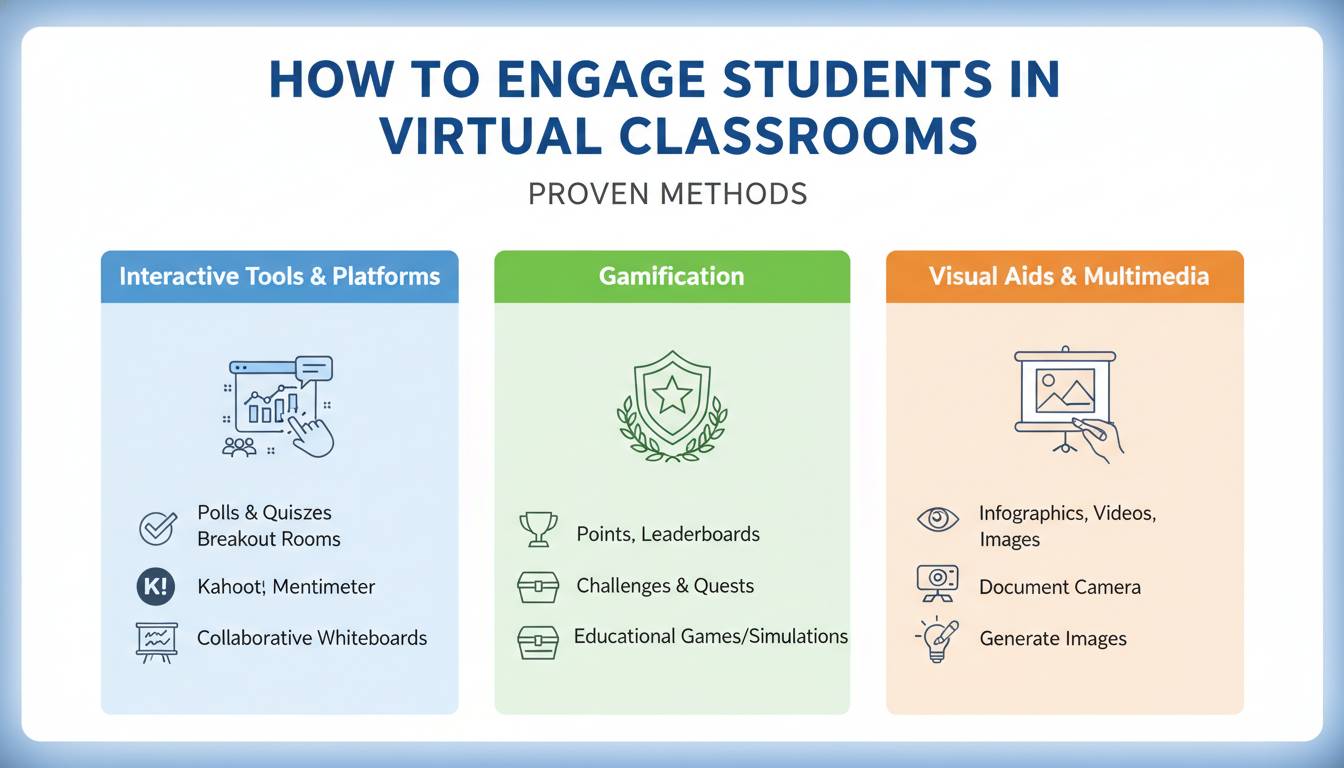
I’ve watched countless virtual classrooms where students log in, screens glowing, cameras dark, participation limited to the occasional mute toggle. This pattern of passive presence—attendees in name but ghosts in practice—represents one of the most persistent challenges I’ve encountered working alongside educators navigating digital instruction. The learning outcomes that result from this disengagement ripple through everything from course completion rates to students’ long-term confidence in online learning environments. While the shift to virtual and hybrid formats was initially viewed as temporary, it has fundamentally changed what effective teaching requires, demanding new strategies for capturing and maintaining attention in spaces where physical presence is replaced by pixels.
This guide compiles methods I’ve seen educators across K-12 and higher education successfully implement to shift passive virtual learners toward active participation. These approaches draw from documented research, observable outcomes in educational settings, and established best practices in online pedagogy that have demonstrated consistent results.
The Engagement Crisis in Virtual Learning
When traditional lecture-based instruction designed for physical classrooms transfers directly to digital platforms, the results often disappoint. Students attending from bedrooms, shared spaces, and remote locations face genuine challenges maintaining focus when the environmental cues of a physical classroom—peer presence, spatial cues, the ritual of gathering—are absent entirely.
The National Survey of Student Engagement’s 2020 Annual Results found that only 39% of students in fully online courses reported spending 11 or more hours per week on coursework, compared to 56% of students in traditional face-to-face courses (NSSE, 2020). According to Quality Matters’ 2022 Online Learning Survey, 67% of responding institutions identified student engagement as their primary challenge in online course delivery. A meta-analysis conducted by the U.S. Department of Education’s Office of Planning, Evaluation, and Policy Development in 2017 found that instruction combining online and face-to-face elements produced better outcomes than purely face-to-face instruction, but noted that purely online instruction showed mixed results compared to traditional formats—suggesting that engagement strategies make the critical difference in outcomes.
The consequences extend beyond individual performance metrics. Research published in the Internet and Higher Education journal found that online learners who reported lower engagement levels were 3.4 times more likely to withdraw from courses compared to their more engaged peers. For educators, this manifests as frustration and a diminished sense of teaching effectiveness when students appear to tune out.
Recognizing why conventional methods often underperform in virtual environments creates the foundation for implementing solutions that actually work.
What Actually Drives Engagement in Virtual Classrooms
Student engagement in virtual environments operates differently from physical classroom engagement. The Community of Inquiry (CoI) framework, developed by Garrison, Anderson, and Archer and published in the Internet and Higher Education journal in 2000, identifies three overlapping dimensions: behavioral engagement (participation and task completion), cognitive engagement (meaningful processing of content), and emotional engagement (positive attitudes toward learning and the learning community). The framework has been validated in over 200 peer-reviewed studies and remains one of the most cited models in online learning research.
In physical classrooms, environmental factors naturally support engagement—social accountability from peers, immediate feedback through body language and expression, the psychological effect of shared physical space. Virtual environments remove these cues, placing the responsibility for engagement squarely on instructional design and facilitation choices that educators make deliberately.
Effective virtual engagement requires educators to become intentional designers of interaction. Each element of a virtual session must purposefully create opportunities for students to act, respond, connect, and contribute. Without this intentionality, the default student experience becomes passive consumption—watching slides, listening to narration, and gradually disconnecting.
In my experience observing virtual classrooms across various institutions, the most effective educators approach virtual sessions as interactive experiences rather than digital lectures. They plan engagement opportunities with the same rigor they apply to content delivery, understanding that meaningful participation doesn’t happen spontaneously but results from thoughtful instructional design.
Technology Tools That Fuel Active Participation
Selecting appropriate technology tools forms the foundation for engagement strategies. The educational technology market offers numerous platforms designed specifically to increase interaction, but educators achieve better results when choosing tools based on their specific teaching context and learning objectives rather than adopting every new platform.
Poll and Quiz Platforms serve as engagement triggers throughout sessions. Tools like Poll Everywhere, Kahoot!, and Mentimeter allow educators to pose questions in real-time, creating immediate participation opportunities. A 2019 study published in the Journal of Chemical Education found that students who responded to in-class polling questions showed 16% higher retention on immediate post-tests compared to non-responding peers. These tools work because they create accountability—students must respond, breaking the passive observation pattern.
Collaborative Whiteboards transform students from viewers to contributors. Platforms such as Miro, Jamboard, and Microsoft Whiteboard enable real-time visual collaboration where students can add ideas, annotate content, and build collective understanding. For subjects ranging from collaborative brainstorming in business courses to annotating texts in literature classes, these tools make thinking visible to the entire class.
Breakout Room Functionality, available in Zoom, Microsoft Teams, and Google Meet, allows educators to split large virtual classes into smaller groups for focused discussion. Smaller group sizes increase participation rates because social accountability rises and anonymity decreases in intimate settings. From my observations, educators consistently report that breakout room activities generate more verbal participation compared to whole-class formats, particularly among students who rarely contribute in larger groups.
Annotation and Markup Tools let students interact directly with content. Whether highlighting key passages in a shared document, circling areas of interest in an image, or adding comments to a video, these tools keep students actively working with material rather than passively receiving it.
When selecting tools, prioritize simplicity and reliability over feature complexity. In my practice, I’ve found that introducing too many platforms creates technical barriers that actually decrease engagement. Choose one or two primary tools and develop proficiency before expanding your technology stack.
Interactive Techniques for Live Virtual Sessions
Technology tools create possibilities, but techniques determine outcomes. The most powerful engagement strategies combine technology with intentional facilitation practices that keep students invested throughout the session.
The Warm-Up Protocol sets the tone from the first minute. Rather than beginning with content delivery, start with a low-stakes engagement activity that requires immediate response. This might be a simple poll question, a prompt to share something in the chat, or a brief reflection question. The goal is to establish early that this session requires active participation, not passive observation. Research on attention patterns in instructional settings published in Educational Psychology Review indicates that initial engagement activities can increase subsequent participation by up to 23%.
Strategic Questioning replaces rhetorical questions with genuine prompts that require student response. Rather than asking “Does everyone understand?”—which most students ignore—pose specific questions that require answers in the chat or verbal response. Use “think-pair-share” adapted for virtual environments: ask students to formulate their own answer, share with a partner in breakout rooms, then report back to the whole group. This creates multiple participation touchpoints within a single concept.
Movement and Physical Activity might seem impossible in virtual settings, but brief physical breaks can improve cognitive engagement. Every 20-25 minutes, incorporate a 30-60 second stretch break where students are encouraged to stand, move, or look away from screens. Research by Shallert and colleagues published in Applied Cognitive Psychology found that cognitive performance tends to decline noticeably after 20-30 minutes of uninterrupted instruction. Virtual sessions that present uninterrupted content without respite often see participation drop noticeably after the 20-minute mark.
Content Chunking organizes information into digestible segments. Rather than presenting 45 minutes of uninterrupted content, structure sessions into 10-15 minute segments, each followed by an interaction opportunity. This approach aligns with cognitive load theory, first articulated by John Sweller in 1988 in the journal Instructional Science and now supported by over three decades of research, demonstrating that working memory can only hold limited information before comprehension suffers. The pattern of “content segment + interaction + content segment + interaction” helps maintain attention throughout extended sessions.
Visible Thinking Protocols require students to externalize their reasoning. Strategies like “explain your answer in chat,” “share your reasoning,” or “teach this concept to a partner” force students to process information at deeper levels than simple recall. When students must articulate their understanding, their engagement shifts from surface-level recognition to meaningful comprehension.
Building Community in Online Learning Environments
Student engagement persists most strongly when learners feel connected to their peers and instructor. Community building in virtual environments requires deliberate effort because the casual interactions that build relationships in physical spaces—hallway conversations, pre-class chatter, post-class questions—don’t happen organically online.
Structured Introductions at the start of courses or units create foundational connections. Rather than generic “share your name and major” exercises, design introductions that reveal something meaningful: a learning goal, a relevant experience, or a question they hope to answer. These richer introductions create more points of connection between students and often spark ongoing conversations.
Peer Connection Rituals embed relationship-building into regular class patterns. Beginning each session with a brief “check-in” where students share one word describing their current state, or using a recurring “find someone who…” activity with shared characteristics, creates predictable opportunities for social connection. Over time, these rituals foster a sense of collective purpose that sustains engagement through challenging material.
Student Spotlight Moments celebrate contributions and create recognition. Highlighting excellent work, recognizing helpful contributions in forums, or featuring student-created content demonstrates that the virtual classroom is a genuine community where individual contributions matter. These moments create aspirational engagement among students who want to be recognized themselves.
Instructor Presence requires more intentional effort online than in physical classrooms. Students in online environments often feel isolated and wonder whether their instructor is genuinely invested in their learning. Regular video check-ins, personalized feedback on assignments, weekly announcements that address students by name, and visible responsiveness to questions all demonstrate presence. The Community of Inquiry framework, which I referenced earlier, identifies instructor presence as one of three critical factors in meaningful online learning experiences.
Assessment Strategies That Promote Active Learning
Assessment practices powerfully shape student behavior. When assessments focus exclusively on demonstrating knowledge at the end of units, students often disengage from the learning process itself. When assessments become integral parts of the learning journey, they drive ongoing engagement.
Low-Stakes Frequent Assessments maintain continuous engagement throughout courses. Frequent quizzes, brief reflection submissions, or weekly check-ins keep students accountable to course material without creating the anxiety that leads to disengagement. Platforms like Canvas, Blackboard, and Moodle support automated low-stakes assessments that provide immediate feedback to students while reducing instructor grading burden.
Gamification Elements introduce game-like mechanics into learning activities. Point systems, badges for achievement, leaderboards for participation, and progress visualization tap into fundamental human motivations for achievement and competition. A meta-analysis published in Computers & Education in 2021, analyzing 68 studies on gamification in education, found a moderate positive effect on learning outcomes (d = 0.33) and stronger effects on engagement-related measures (d = 0.48).
Project-Based Learning with clear real-world connections increases relevance and investment. When students work on extended projects that produce tangible outcomes—whether creating a portfolio, developing a presentation, or producing creative work—they engage more deeply than when completing isolated assignments. Virtual environments support project-based learning well through shared documents, asynchronous collaboration tools, and digital presentation capabilities.
Formative Feedback Loops help students understand their progress and adjust their efforts. Unlike summative assessments that evaluate at the end, formative assessments inform learning during the process. In virtual environments, automated feedback from quizzes, self-assessment rubrics, and peer review processes create multiple checkpoints that keep students actively monitoring their own learning.
Common Mistakes That Undermine Virtual Engagement
Even well-intentioned educators frequently undermine their engagement efforts through common pitfalls. Recognizing these mistakes helps avoid patterns that waste effort while failing to produce results.
Talking Without Interaction remains the most prevalent error. Many educators comfortable with lecture formats continue delivering content without building in participation opportunities. Students quickly learn that they can minimize the window, silence the audio, and still “attend” the session. No amount of interesting content compensates for the absence of interaction requirements.
Technical Complexity Creates Barriers. Introducing multiple new tools in a single session, requiring complex setup processes, or choosing platforms with steep learning curves frustrates students and redirects cognitive energy from learning to troubleshooting. When students struggle with technology, engagement plummets. Always test tools in advance, provide clear instructions, and maintain backup plans.
Ignoring Asynchronous Engagement limits options to synchronous session participation alone. Not all students can attend live sessions, and not all effective engagement requires simultaneous presence. Discussion forums, collaborative documents, video responses, and asynchronous peer review create engagement opportunities that fit diverse schedules and learning preferences.
Inconsistent Facilitation confuses students about expectations. When engagement activities appear occasionally rather than systematically, students don’t develop participation habits. Consistent integration of engagement strategies throughout a course builds culture where participation becomes normal rather than exceptional.
Frequently Asked Questions
How do I engage students who won’t turn on their cameras in virtual classes?
Camera-on policies remain debated in the field, with educators reporting varying outcomes based on their specific student populations. Rather than mandating cameras, I’ve found it more effective to focus on creating participation value that motivates students to engage. Use chat-based interactions, polling,