

 March 21, 2026
  13 Min
  No Comment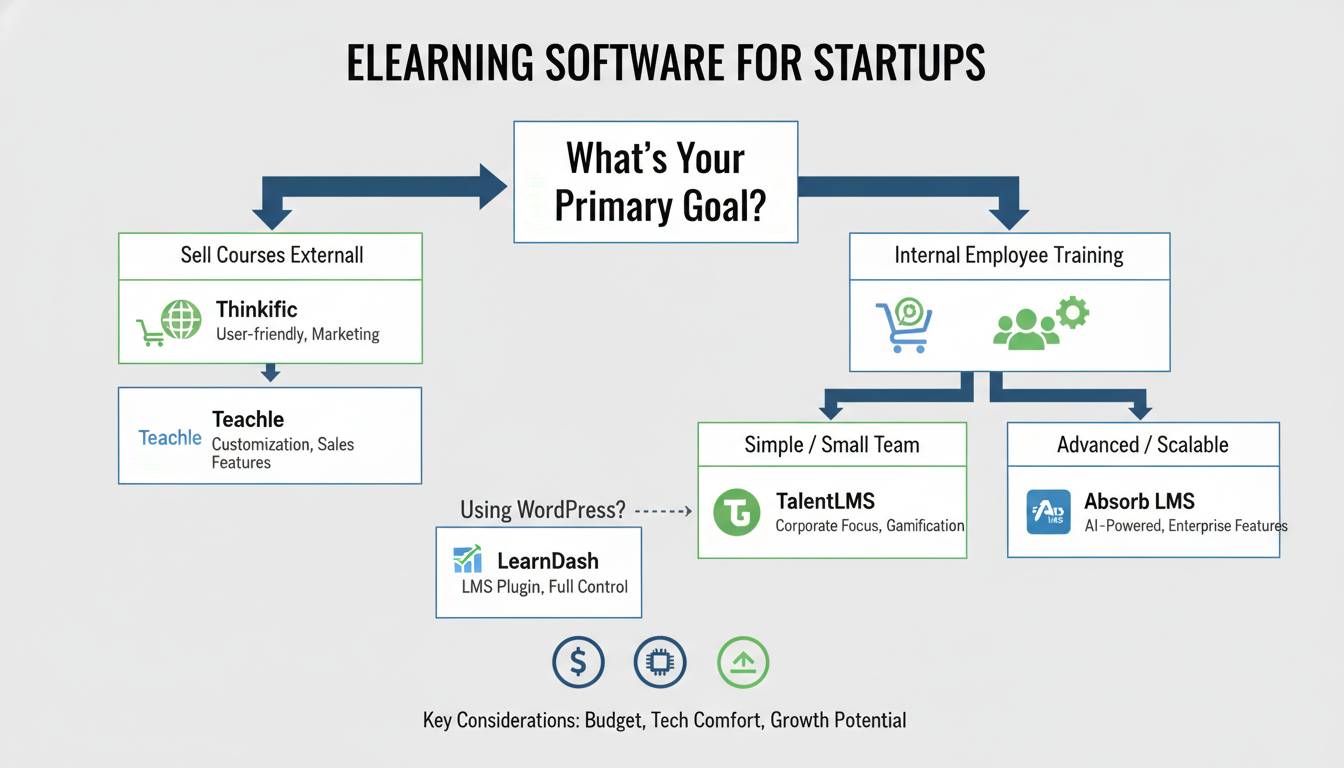
Startups face a unique challenge in the elearning space: you need enterprise-grade training capabilities without enterprise-level budgets. The right elearning platform can help you onboard talent faster, scale your knowledge base, and build recurring revenue through online courses—but choosing incorrectly means wasted resources and frustrated teams.
This guide compares the best elearning software for startups based on pricing, features, scalability, and real-world performance. Whether you’re building your first online course or implementing a full learning management system, you’ll find actionable insights to make the right choice.
What Startups Actually Need From Elearning Software
Before examining specific platforms, understanding your baseline requirements prevents costly mistakes. Startups typically prioritize four factors that differ from established enterprises:
Budget constraints drive most decisions. Enterprise LMS platforms often price out startups with per-user fees that scale painfully. Look for flat-rate pricing or generous free tiers that don’t penalize growth.
Speed of implementation matters more than feature depth. You need platforms that launch courses in hours, not months. Complex configuration and lengthy onboarding defeat the purpose for lean teams.
Scalability must match your growth trajectory. The platform that works for 10 employees should also work for 100 without requiring migration or massive price jumps.
Integration capability determines whether your elearning data flows with your existing stack. Marketing automation, CRM, and analytics integrations save manual work and provide unified insights.
A 2023 survey by TalentLMS found that 72% of small businesses cited cost as the primary barrier to adopting elearning platforms, while 64% struggled with implementation complexity. Your software choice directly addresses both concerns.
Top Elearning Platforms for Startups
Teachable: Best for Revenue-Focused Course Creators
Teachable has positioned itself as the platform for entrepreneurs building online course businesses. Over 50,000 creators use the platform, with particular strength in the startup and solopreneur segments.
Pricing: Teachable offers a free plan (with transaction fees) starting at $39/month for their Basic tier, Professional at $119/month, and Business at $239/month. The free plan processes one course with basic analytics.
Key Features:
- Course builder with drag-and-drop simplicity
- Integrated payment processing (no third-party setup required)
- Automated email sequences for student engagement
- Quiz and assessment tools
- Certificates of completion
- Revenue sharing and affiliate programs
Startup Fit: Teachable excels if your goal is monetizing knowledge—selling courses directly to customers or clients. The onboarding takes less than a day, and the built-in marketing tools reduce your tech stack complexity. However, internal training use cases feel like an afterthought, and the per-course structure limits organizational learning scenarios.
Limitations: Transaction fees on free plans eat margins. The gamification features lag behind competitors. Customer support response times have drawn criticism during peak periods.
Thinkific: Best for Course Quality and Customization
Thinkific powers over 40 million students across its platform and competes directly with Teachable for the course-creation market. The platform has invested heavily in instructional design tools that appeal to serious educators.
Pricing: Thinkific’s Free plan allows one course with unlimited students. Paid plans start at $49/month (Basic), $99/month (Pro), and $249/month (Growth). Annual billing provides 20% discounts.
Key Features:
- Advanced course builder with templates
- Course bundling and upsells
- Integrated blogging platform
- Detailed student analytics
- Compliance training templates
- White-label options on higher tiers
Startup Fit: Thinkific provides more design flexibility than Teachable, making it suitable for startups investing heavily in brand experience. The compliance training templates help startups handling regulated industries avoid legal exposure. The free tier is genuinely useful for testing course concepts before committing budget.
Limitations: Email marketing integrations require third-party tools more frequently than competitors. The community features feel underdeveloped compared to newer platforms. Some users report course export complications when switching platforms.
Kajabi: Best All-in-One Marketing and Learning Platform
Kajabi represents the premium end of startup-focused elearning, targeting serious course creators who want marketing automation bundled with their learning platform. The company reports over 50,000 active users and has positioned itself as a complete business-in-a-box solution.
Pricing: Starting at $149/month (Basic), $199/month (Pro), and $399/month (Growth). Annual plans reduce monthly costs by approximately 20%. Higher price points reflect the comprehensive feature set.
Key Features:
- Built-in email marketing and automation
- Landing page and website builder
- Podcast hosting and management
- Pipeline and sales funnel tools
- Advanced analytics dashboard
- Community features and member forums
Startup Fit: Kajabi eliminates the need for separate email marketing, CRM, and course platforms—a significant advantage for lean startups. If your business model involves selling courses or membership sites, the consolidated toolset reduces monthly software costs while increasing automation capabilities. The learning management features rival dedicated platforms while adding business development tools.
Limitations: The learning experience lacks some specialized LMS features like sophisticated competency tracking. The price point exceeds other startup-focused options significantly. The learning curve is steeper due to the comprehensive feature set—setup requires more time investment.
Podia: Best Budget Option for Simple Course Delivery
Podia has gained traction as the no-frills alternative, stripping away complexity to focus on straightforward course and membership delivery. The platform positions itself as creator-friendly with zero transaction fees on paid plans.
Pricing: Podia’s Free plan includes one product with unlimited students. Mover plans start at $39/month for unlimited products and zero transaction fees. Sprouter at $89/month adds email marketing and course upsells. Steadier at $149/month includes memberships and advanced analytics.
Key Features:
- Unlimited courses and students on all paid plans
- No transaction fees ever
- Direct integrations with Mailchimp and ConvertKit
- Community building features
- Drip content scheduling
- Affiliate program management
Startup Fit: Podia makes financial sense for early-stage startups testing course concepts. The zero transaction fees mean your margin stays consistent regardless of revenue volume. The simplicity appeals to teams without technical resources for platform management. The email marketing integration (on Sprouter and above) covers basic automation needs without Kajabi-level complexity.
Limitations: The course builder offers fewer customization options than Teachable or Thinkific. Advanced features like quizzes and certificates require third-party tools. The analytics dashboard provides less depth than competitors—insights are adequate but not comprehensive.
LearnWorlds: Best for Interactive Learning Experiences
LearnWorlds differentiates through its emphasis on interactive learning—moving beyond passive video consumption to engage students through social learning, assessments, and collaborative features.
Pricing: Plans start at $29/month (Starter), $99/month (Pro Trainer), and $249/month (Learning Center). The lower starting price point makes it accessible for early-stage startups.
Key Features:
- Interactive video player with annotations
- Built-in community and social features
- Advanced assessment builder with diverse question types
- White-label mobile app options
- SCORM compliance for enterprise migrations
- Personalized learning paths
Startup Fit: LearnWorlds serves startups where learning effectiveness directly impacts business outcomes—product training that affects customer success, compliance training that reduces risk, or internal training that accelerates productivity. The interactive features improve knowledge retention compared to passive video-only platforms. SCORM compatibility provides flexibility if you later need to integrate with larger enterprise systems.
Limitations: The interface requires more learning time than simpler competitors. Marketing and sales features lag behind Teachable and Kajabi. The design customization, while powerful, requires more technical comfort to execute well.
TalentLMS: Best for Internal Training and SMB Teams
TalentLMS targets businesses needing internal training capabilities rather than course sales—a different use case than most platforms on this list. The cloud-based LMS focuses on simplicity and scalability for teams from 5 to 5,000 employees.
Pricing: Free plan supports up to 5 users and 100MB storage. Paid plans start at $59/month for up to 40 users (Basic), $129/month for up to 100 users (Plus), and custom pricing for larger deployments. Annual billing provides approximately 20% savings.
Key Features:
- Course library with off-the-shelf content
- User hierarchy and team management
- Certification and compliance tracking
- Detailed reporting and analytics
- Gamification elements (badges, leaderboards)
- Mobile app for iOS and Android
Startup Fit: TalentLMS addresses the internal training gap that plagues startups scaling their workforce. The free tier genuinely supports small team onboarding and training without budget constraints. The course library provides immediate content for common training scenarios—compliance, safety, software skills—without requiring you to build everything from scratch. The gamification features improve engagement with mandatory training that typically suffers from low completion rates.
Limitations: Course creation tools are less intuitive than dedicated course platforms. The sales and marketing features are minimal—you’re using a learning management system, not a course business platform. Customer support responsiveness varies by plan tier.
How to Choose: Decision Framework for Startups
With the options mapped, use this decision framework based on your primary use case:
Selling online courses to external customers:
→ Choose Teachable (easiest setup) or Thinkific (more customization). Upgrade to Kajabi if you need integrated marketing automation and have the budget.
Building internal employee training:
→ Choose TalentLMS for structured learning paths and compliance tracking. The free tier supports early-stage team development effectively.
Testing a course concept with minimal investment:
→ Choose Podia for zero transaction fees and straightforward course delivery. The free plan allows validation before financial commitment.
Creating interactive, engaging learning experiences:
→ Choose LearnWorlds for advanced interactive features that improve knowledge retention.
Building a comprehensive knowledge commerce business:
→ Choose Kajabi despite the premium price—the integrated platform reduces overall software costs and complexity for serious course businesses.
Common Startup Mistakes When Choosing Elearning Software
Mistake #1: Prioritizing Features Over Immediate Needs
Startups often choose platforms with extensive feature sets they’ll use “later.” This creates unnecessary complexity and higher costs. Better to start with simpler platforms and migrate when requirements mature.
Solution: List your must-have features for the next 6 months. Filter platforms against those requirements only. Reserve future needs as a “nice to have” factor.
Mistake #2: Ignoring Total Cost of Ownership
Many platforms advertise low starting prices but charge transaction fees, add-on fees, or price jumps at scale. A $39/month platform with 10% transaction fees becomes more expensive than a $149/month flat-rate option at certain revenue levels.
Solution: Calculate your projected annual cost at your expected scale—not just today’s usage. Factor in time spent on workarounds for missing features.
Mistake #3: Selecting Before Testing
Platforms vary significantly in actual user experience. Interface preferences are personal and impact daily work significantly.
Solution: Test at least two platforms with free trials or free tiers. Build a real (even small) course in each. Your time investment reveals practical usability that feature lists obscure.
Mistake #4: Underestimating Migration Complexity
Moving courses, student data, and completion records between platforms is rarely seamless. The time investment often exceeds initial expectations.
Solution: Choose your platform with long-term intent, not just immediate needs. Review export capabilities before committing. Some platforms make migration intentionally difficult.
Implementation Timeline: From Selection to Launch
Once you’ve selected your platform, expect this typical timeline:
Week 1: Account setup, branding configuration, and team permissions. Define your first course structure and outline learning objectives.
Week 2: Content creation or curation. This phase varies dramatically based on whether you’re creating original content or using pre-built libraries. Building from scratch takes 2-4 weeks per course hour of content.
Week 3: Platform configuration—integrations, email sequences, automation rules. Setting up assessments and certificates if applicable.
Week 4: Testing with a small pilot group. Gather feedback, fix issues, and refine the experience.
Week 5+: Full launch and iteration based on engagement data.
TalentLMS and Podia typically allow faster setup (2-3 days for basic implementations), while Kajabi and LearnWorlds require more configuration time but deliver more comprehensive solutions.
Frequently Asked Questions
What is the best free elearning platform for startups?
TalentLMS offers the most capable free plan for internal training (up to 5 users), while Podia and Thinkific provide free tiers suitable for selling courses. Each has limitations—TalentLMS restricts user count, while Podia and Thinkific limit features on free plans. For testing course concepts, Thinkific’s free tier provides the best balance of features and scale.
How much does elearning software cost for a startup?
Entry-level plans range from $0 to $59/month. Mid-tier options with robust features cost $99-199/month. Comprehensive platforms like Kajabi reach $149-399/month. Most platforms offer 20-30% discounts for annual billing, significantly reducing effective costs.
Can startups use enterprise LMS platforms?
Yes, but typically impractical. Enterprise platforms like Cornerstone, SAP SuccessFactors, or Workday require substantial implementation budgets ($50,000+), making them inaccessible for startups. SMB-focused alternatives like TalentLMS, Absorb LMS, or Lessonly provide appropriate capability at startup-friendly price points.
What features do startups need most in elearning software?
Based on startup priorities, the most valuable features include: quick course creation tools, mobile accessibility, basic analytics, certificate generation, and integration with common tools (Slack, Zapier, Google Workspace). Advanced features like AI-powered recommendations or sophisticated competency mapping typically become relevant only as organizations mature.
Is it better to build custom elearning or use a platform?
For 95% of startups, platforms provide better value. Custom development costs range from $30,000-200,000+ for basic functionality, plus ongoing maintenance. Platforms deliver better features, regular updates, and support infrastructure at a fraction of that cost. Only unique requirements that platforms cannot address justify custom development.
How long does it take to launch a course on these platforms?
Simple course launches (under 1 hour of content) can go live within 1-2 days using templates and basic recording tools. Comprehensive courses with multiple modules, assessments, and interactive elements typically require 4-8 weeks from concept to launch when built from scratch.
Conclusion: Making Your Decision
The best elearning software for your startup depends entirely on your specific use case and stage. Don’t overcomplicate the selection—start with clear answers to three questions:
- Are you selling courses externally or training internal teams?
- What’s your budget for the next 12 months?
- How much time can your team invest in platform setup and management?
For most startups, TalentLMS provides the best internal training value, while Teachable or Thinkific serve course creators most effectively. Podia offers the lowest barrier to entry for testing ideas, and Kajabi delivers the most comprehensive platform when your business can justify the investment.
Start with your free tier or trial. Build one small course. Test with real users. Your initial choice isn’t permanent—platform migrations happen regularly—but selecting wisely from the beginning saves significant time and money as your startup scales.